Digital Signature Wall vs Video Guestbook (Singapore Events)
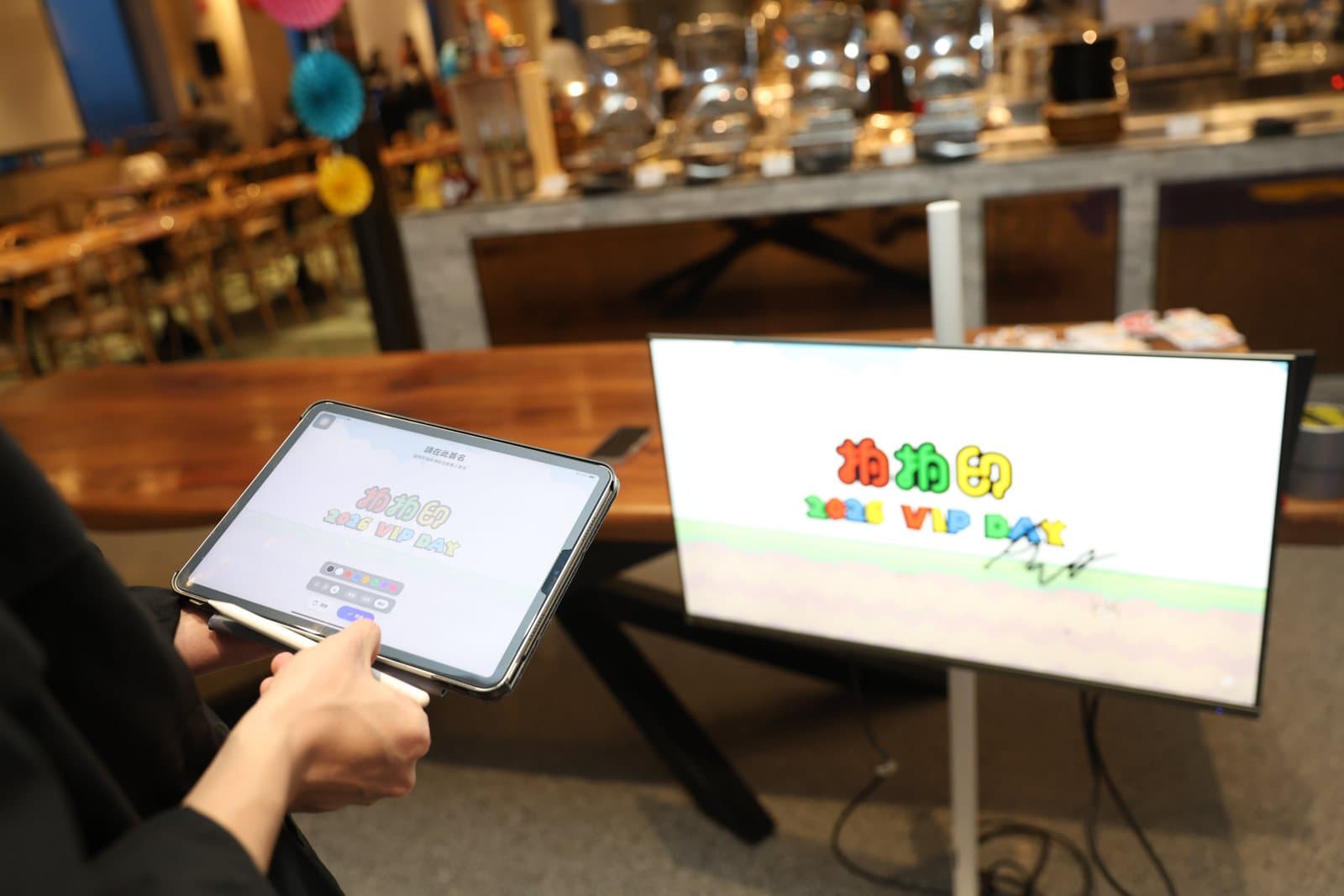
A digital guestbook replaces the signing silk or the paper book at the door with something guests can see on the big screen or keep on their phones. In Singapore two versions get booked most for a corporate event: the digital signature wall, where guests hand-sign on a tablet and the signature lands on the LED screen instantly, and the video guestbook, where guests record a short video message on their own phone by scanning a QR code. Planners usually ask us which one to book for a grand opening, an anniversary or a Dinner and Dance (DND). The honest answer is that they do different jobs, and the choice depends on whether you want a moment in the room or a record you keep afterwards.
What a digital signature wall in Singapore actually does
One tablet on a stand, a pen, a row of ink colours. A guest writes their name, taps send, and a second later the signature appears on the venue screen alongside every name before it. There is no login, no form and no account to add, which is why take-up is so high: taking part costs five to ten seconds. The background, logo, event key visual, signature styles and screen layout are all customised before the event, so the wall reads as part of the stage design rather than a piece of equipment. At the end of the night the wall is effectively a group portrait of everyone who came, and every signature can be kept and compiled for the organiser.
Two practical limits to know: signing is one guest at a time, queuing in turn, and the content is currently handwritten signatures rather than long messages. That makes it a ceremony tool, ideal at the entrance or during an opening segment, not a way to collect what guests think.
What a video guestbook in Singapore actually does
The video guestbook runs on the guest’s own phone. They scan a QR code on a standee or table card, the guestbook opens in the browser with no app to download, they face the camera and say something. Clips upload the moment they finish, collect into one shared event album, and can play in sync on the on-site big screen if you want the room to hear them. Voice-only messages are supported for shy guests, and there are optional AI filters for a playful touch. After the event, Pixanity organises everything into a private link for the organiser to browse and download clip by clip.
Because every guest records on their own device at the same time, there is no queue and no single-machine bottleneck. On site it needs only mobile data or Wi-Fi: no recording equipment, and usually no operator. A retro handset recording station can be added as a physical prop, and in practice it helps: with a receiver in hand, guests stop wondering what to do with their hands and actually speak.
Signature wall vs video guestbook: the differences that decide it
- What guests leave: a handwritten signature on the wall vs a 20–60 second video or voice message
- Where it shows: the signature wall lives on the big screen during the event; the video guestbook lives in an album you keep, with optional big-screen playback
- Throughput: one signer at a time on the tablet vs everyone recording at once on their own phones
- Best position in the flow: signature wall at the entrance or opening segment; video guestbook on the way out, when guests have something specific to say
- Site needs: signature wall needs a TV, LED screen or projector that connects to a laptop, power and internet, with crew recommended; video guestbook needs only mobile data or Wi-Fi
- What the organiser gets afterwards: a compiled signature archive vs a private link to every clip
How to plan a digital guestbook for a corporate event
- 01Decide the job first: ceremony and a full-house visual on screen (signature wall), or honest messages you replay later (video guestbook), or both.
- 02Fix the position in the run-of-show. Signature wall at arrival or the opening; video guestbook near the exit. Putting a recording zone at the busiest entrance mostly captures "hello everyone".
- 03Send the key visual, logo and colour references so the wall background, signature styles and the guestbook interface match the event branding.
- 04Confirm the screen. For the signature wall, tell us whether the venue has an LED wall, a projector or a TV, and whether the AV team can give us an input.
- 05For the video guestbook, brief the emcee on one line: "scan the QR on your table and tell us the one thing you liked most tonight". A prompt beats an open question.
- 06Agree the deliverables: compiled signatures for the organiser, and the private album link for clips.
What to prepare on site
- Signature wall: a display that connects to a laptop (TV, LED screen or projector), a power socket and internet. We recommend Pixanity crew on site to keep the queue flowing.
- Video guestbook: mobile data or Wi-Fi is enough. Guests use their own phones, so nothing is installed on site; the system is configured by Pixanity before the event.
- Both: a spot with sightlines. The signature wall reads best on the biggest screen in the room; the video guestbook needs a corner quiet enough that people are willing to talk.
- Optional: the retro handset station for the video guestbook, and a standee or table cards carrying the QR code.
Common Singapore event scenarios and what to book
- Grand opening or press event: signature wall on the LED screen as the VIP sign-in, signatures assembling into the key visual.
- Company anniversary: signature wall at arrival, video guestbook on the way out so long-serving staff can leave a message the company keeps.
- Dinner and Dance: signature wall during the cocktail hour, then the video guestbook as guests leave; pair with a live photo mosaic wall for the opening.
- Farewell or retirement: video guestbook only. The album of clips is the gift.
- Roadshow or exhibition booth: video guestbook for visitor feedback, with no gear to guard on the booth.
Both services are quoted per project on event date, venue, headcount, hours and customisation, and both run islandwide across Singapore. WhatsApp us with your date and headcount and we will suggest which one, or the pairing, fits your run-of-show.
FAQ
A digital signature wall is a ceremony tool: guests hand-sign on a tablet and the signature appears instantly on the big screen, building a wall the whole room completes. A video guestbook is a record: guests scan a QR code and record a video or voice message on their own phone, and the organiser receives every clip in a private album after the event.
No. The signature wall runs on a tablet we provide, with no login. The video guestbook opens from a QR code straight in the phone browser, with no app and no sign-up.
Signing is one guest at a time on the tablet, queuing in turn. Each signature takes five to ten seconds, so the queue moves quickly. If you need everyone participating at once, the video guestbook lets the whole room record simultaneously.
Only mobile data or Wi-Fi. Guests record on their own phones, so there is no recording equipment on site and usually no operator. Pixanity configures the system before the event.
Yes. The signature wall is designed for the big screen and appears there the moment a guest signs. Video guestbook clips upload instantly and can play in sync on the on-site screen if you want the room to share them.
Yes, and it is a common pairing: the signature wall at arrival or the opening segment, the video guestbook on the way out. Both are quoted per project and run islandwide across Singapore.
MORE GUIDES
360 Photo Booth Singapore Price Guide: Video vs Photo, Space, Add-ons (2026)
What a 360 photo booth in Singapore costs in 2026 and what drives the price: the difference between a 360 video booth and a photo booth, how much floor space the platform needs, group capacity, and the add-ons (custom overlay, props, backdrop, extra hours) that change a 360 booth rental quote.
AI Photo Booth Singapore: What It Is, Price, and How to Choose (2026)
A practical guide to the AI photo booth in Singapore for 2026: what a generative AI photo booth actually does, the four modes (outfit swap, caricature, background swap, beauty), what AI photo booth rental costs, how it compares with a traditional booth, and how to plan one for a Dinner and Dance, launch or roadshow.
Best Interactive Games for a Dinner and Dance in Singapore
Interactive games for a Dinner and Dance (DND) in Singapore that scale to 200+ seated guests: big screen games, a live quiz, phone-shake races and retro arcade battles — join by QR, no app.
Tell us your event type, date and headcount
We’ll recommend a setup and a custom quote from real event experience.
Get a quote