Photo Mosaic Wall Singapore: Printed vs Animated LED Mosaic, How It Works
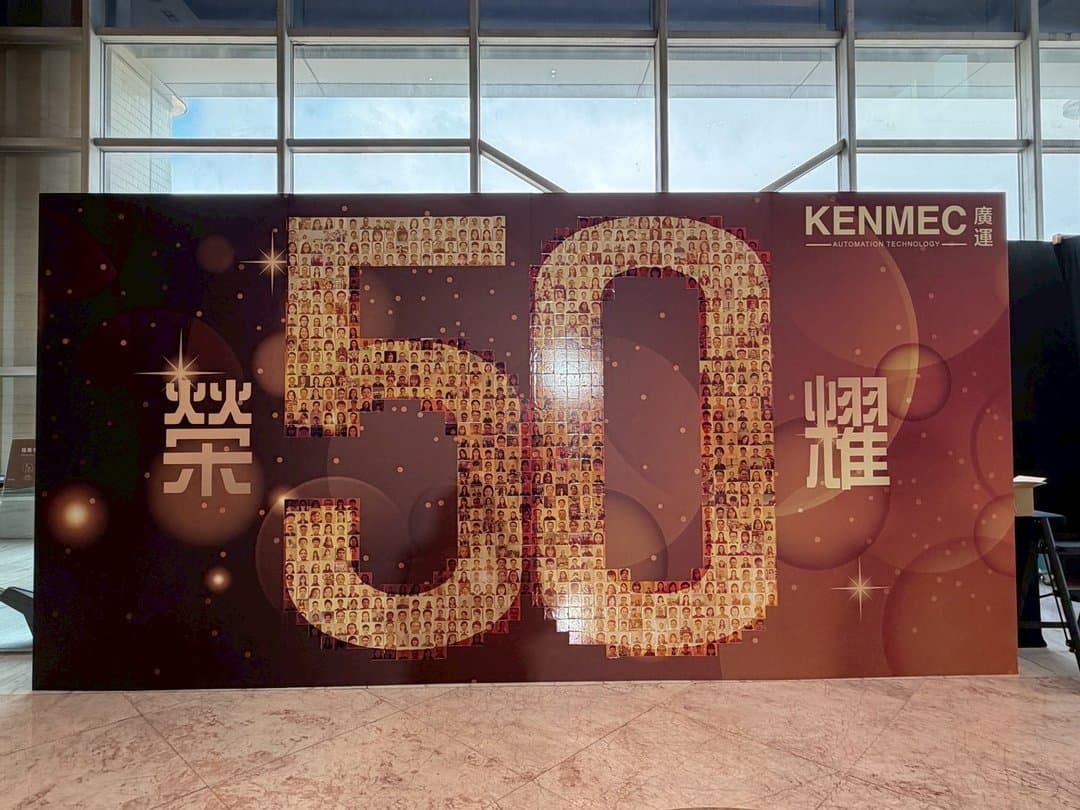
A photo mosaic wall Singapore organisers book for an anniversary or Dinner and Dance (DND) is a simple idea with a strong payoff: hundreds of guest photos, taken on the night, tile into one large image of your logo, anniversary number or event key visual. From across the room it is the brand; up close, every tile is someone who came. The decision most clients need help with is the format, a printed mosaic wall versus an animated photo mosaic on an LED screen. This guide explains how each works, what they need on site, and how to choose.
How a photo mosaic wall works
The mechanism is the same in both formats. You set a base image in advance. Guests scan a QR code, take or upload a photo, no app needed. The system auto-removes the background and centres each face so every tile is clean, then drops the photo into its position in the grid. Photos keep joining throughout the event, so late arrivals still make it in. If there are not enough photos, some repeat so the picture always looks complete. Typical grids are 6 by 6 (36 photos) or 10 by 10 (100 photos), customisable to the event; the base image is supplied by you and Pixanity builds the mosaic layout to your grid and final dimensions.
Printed mosaic wall vs animated LED mosaic
They are two separately priced packages. Book either on its own, or pair them.
- Printed photo mosaic wall: each photo is printed and pasted onto a numbered base grid, either by Pixanity crew or by guests themselves as an interactive segment. You get a physical wall that stays up as the best group-photo backdrop of the night, plus optional personal mosaic stickers for guests to take home. Needs a backdrop, wall space and working room.
- Animated photo mosaic on an LED screen: photos fly into the big screen one by one, auto-position, and assemble into the key visual live. No wall, no floor space, light load-in; the stage screen is the canvas. The full animation exports as a video you keep. Needs a big screen, projector or LED wall and stable internet.
- Pairing both: paste a wall on site while the screen runs the animation. The reveal happens twice, once on the wall and once on the screen.
Two ways to run the animated mosaic
The LED version has two presentation modes, and they suit different run sheets.
- End-of-event video: once uploads close, the system compiles every photo into one finished 3D mosaic video, styled to your theme, played at the close as the finale. With photo counts in the thousands each tile gets small, so Pixanity advises on density.
- Real-time interactive projection (recommended for most events): each photo flies into the live mosaic the moment it is uploaded, so every guest sees their own photo land. A single frame shows roughly 550 photos; beyond that, earlier photos rotate out as new ones arrive, so a room of thousands can cumulatively feature.
Entry style, speed and rhythm are customisable, and the package includes one transition, with more available as an add-on. An optional twist: guests can hand-sign their photo on their phone right after shooting, and the signed photo flies into the mosaic, which gives it the ceremony of a guestbook wall without a separate signing queue.
How to plan a photo mosaic wall
- 01Choose the base image: brand logo, anniversary number, campaign message or the event key visual. Simple, high-contrast shapes read best from across a ballroom.
- 02Pick the format: printed wall for a physical backdrop and keepsake, LED animation for a stage moment and a video to keep, or both.
- 03Set the grid size against expected headcount; 6 by 6 or 10 by 10 are the usual starting points and the final size is planned around photo count and tile size.
- 04Decide who pastes: crew, or guests as an interactive segment with a planned reveal.
- 05Put the reveal on the run sheet: for the animated version, the opening video or the moment before the group photo; for the wall, a countdown when the last tile goes on.
What to prepare on site
- Printed wall: a photo backdrop (yours or arranged by Pixanity), wall space for the mosaic and working room for pasting. It belongs against a wall rather than in central circulation.
- Animated mosaic: a big screen, projector or LED wall, plus stable internet for live uploads; Pixanity can help plan the setup.
- Both: a QR code on signage or tables, and your base image and logo files in advance.
- Standard printed-wall package is 2 hours of service with 2 crew, adjustable to the event.
Which format for which event
- Company anniversary: a printed wall of the anniversary number as the group-photo backdrop, with the LED animation revealed at the toast
- Company Dinner and Dance: real-time animated mosaic on the ballroom screen so tables see their photos land between acts; pairs with a phone-based photo booth for uploads
- Product launch: the launch key visual assembling live on the stage screen, exported as a video for post-event channels
- Grand opening or exhibition: a printed wall that grows over the day, guests hunting for their own tile
- Wedding banquet: the animated version forming the couple's key visual from guest photos
Pricing
Both formats are custom-quoted, and priced separately. The main factors are venue and on-site equipment, service hours and load-in time, estimated headcount, complexity of the key-visual and animation customisation, whether personal sticker printing is included, and staffing. WhatsApp us with your event date, headcount and the image you want to build, and we will suggest a format, grid size and a quote, usually within one business day.
FAQ
A photo mosaic wall is a real-time image-tiling activation. Guests scan a QR code to upload a photo, AI removes the background and centres the face, and hundreds of guest photos tile into your logo, anniversary number or event key visual, either printed onto a physical wall or assembled as an animation on an LED screen.
The printed version prints each photo and pastes it onto a large base grid, leaving a physical wall guests can pose with. The animated version has photos fly into a big screen and assemble live, with the result exported as a video. They are separate packages and can be booked together.
No. Guests scan a QR code with their phone and upload a photo. For the printed wall they can also paste their own tile as an interactive segment.
Typical grids are 6 by 6 for 36 photos or 10 by 10 for 100, and the grid is customised to your headcount. If there are not enough photos, some repeat so the picture always completes. The real-time animated version shows roughly 550 photos per frame and rotates in more.
Yes. The base image can be your brand logo, an anniversary number, a message or the event key visual. You supply the image and Pixanity builds the mosaic layout to match the grid size and final dimensions.
For the printed wall: a backdrop, wall space and working room. For the animated version: a big screen, projector or LED wall and stable internet. Pixanity crew handle setup and operation in both cases.
MORE GUIDES
360 Photo Booth Singapore Price Guide: Video vs Photo, Space, Add-ons (2026)
What a 360 photo booth in Singapore costs in 2026 and what drives the price: the difference between a 360 video booth and a photo booth, how much floor space the platform needs, group capacity, and the add-ons (custom overlay, props, backdrop, extra hours) that change a 360 booth rental quote.
AI Photo Booth Singapore: What It Is, Price, and How to Choose (2026)
A practical guide to the AI photo booth in Singapore for 2026: what a generative AI photo booth actually does, the four modes (outfit swap, caricature, background swap, beauty), what AI photo booth rental costs, how it compares with a traditional booth, and how to plan one for a Dinner and Dance, launch or roadshow.
Best Interactive Games for a Dinner and Dance in Singapore
Interactive games for a Dinner and Dance (DND) in Singapore that scale to 200+ seated guests: big screen games, a live quiz, phone-shake races and retro arcade battles — join by QR, no app.
Tell us your event type, date and headcount
We’ll recommend a setup and a custom quote from real event experience.
Get a quote